How we mapped two floors of two connected Cornell buildings with one phone, route people through them, find them without beacons, and talk them there. The interactive figures run on the building's real map.
GPS stops at the front door. Inside, you're left with signs, floors that look alike, and asking whoever is at the desk. Indoor positioning has worked for years, as long as you bolt hardware to the ceiling, and installing and maintaining that hardware is a big reason most buildings still don't have it.
We set one rule before writing any code: nothing powered gets installed in the building. Everything had to come from a phone in someone's hand: the one that maps the building, and the one held by the person trying to find room 294.
marko is the result. You raise your phone, search for a room, a professor or "restroom", and a trail appears on the real floor in front of you. Lower the phone and it becomes a Find My-style arrow. A voice guide speaks every turn. We built it over a weekend at MLH Big Red Hacks in October 2026, where it took 2nd place, for the Physical Sciences Building (PSB) and the connected Clark Hall at Cornell.
The maps below are interactive and run on the building's real map. Where a number is illustrative, the caption says so.
Walking is the map
Our first plan was to start from architectural floor plans. It went badly: drawings carry no reliable scale or north, tracing corridors from them invented hallways that don't exist, and a map that's wrong about geometry sends people confidently into walls. So instead, someone walks every corridor with an iPhone. We call that the Capture Walk. It's to scale by construction, it only contains places a person can actually walk, and everything else marko needs is built from it.
Floor 2 · the walk
Routing in milliseconds, on the phone
Each floor becomes a grid of walkable space, joined to the next by the stairs recorded on the walk. Routes are solved entirely on the phone, in milliseconds, then straightened into a few long legs. The corners that remain become the turns in the instructions. Try it below: it solves in your browser, on the same map.
- walking
- –
- at 1.3 m/s
- –
- cells explored
- –
- to solve, in your browser
- –
Floor 2
Floor 1 · the atrium
Finding you, without beacons
Routing is the easy half. The hard half is answering "where am I?" in a steel-and-concrete building where GPS is useless and the compass is unreliable. Early on we learned the rule that shaped everything after:
A confident wrong fix is worse than no fix.
A wrong fix doesn't look wrong. It draws the trail with full confidence and walks someone down a hallway that looks identical to the right one. Matching what a corridor looks like isn't enough, because many corridors look the same. marko matches the shape of the space around you against the building's map, and only answers when one place fits clearly better than every other.
Your scan
Where it could be on floor 1
Rejected: 0 spots fit equally well. marko keeps looking instead of guessing.
A fix tells you where you are once. Between fixes, the phone tracks its own motion, and each fix ties that motion back to the building. Counting steps with a compass, the usual approach and marko's last resort, drifts badly near steel and lab equipment.
- step counting off by
- 0.0 m
- marko off by
- 0.0 m
A trail on the real floor
Once the phone knows where it is, the Route is drawn onto the actual floor: a band of chevrons (the "k" from marko's wordmark) leading to the next turn, and a ring at the destination. Phone up gives you the trail. Phone down gives you an arrow with the distance and one line of instruction. A floor change takes over the screen until you're on the new floor.
Phone up · Route Ribbon
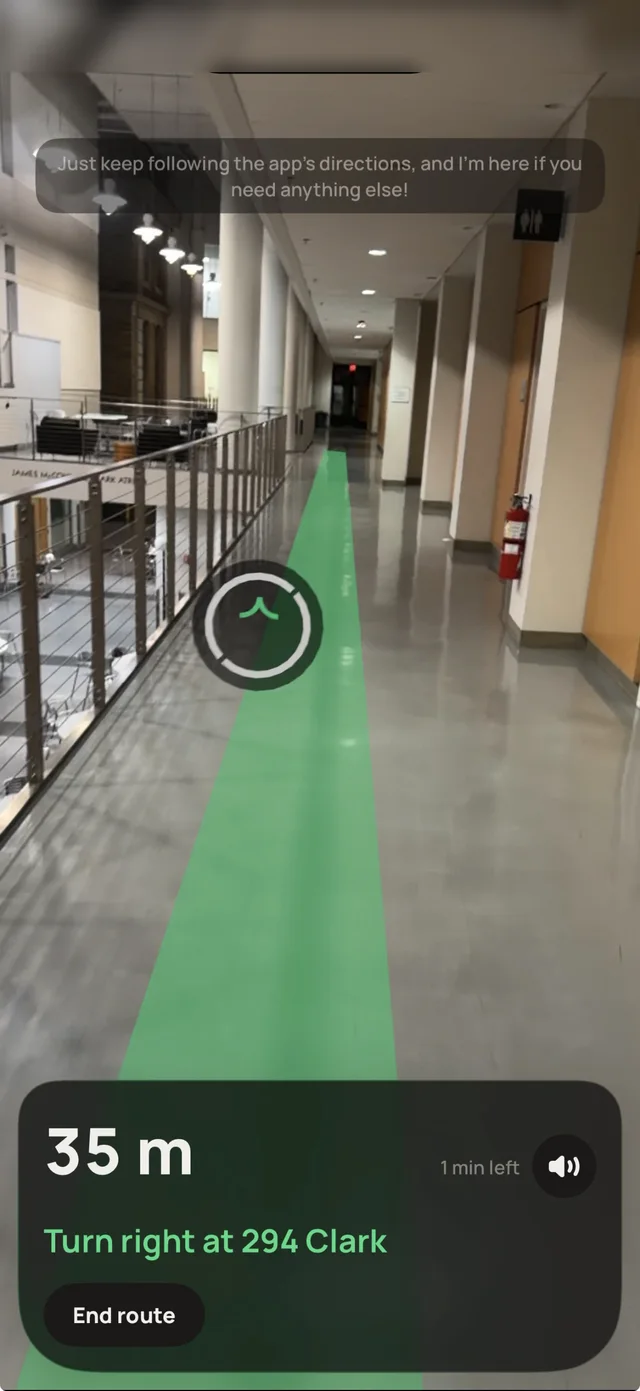
Held up, the camera sees the corridor, so marko draws the Route into it, from your feet to the next turn.
Phone down · Guidance Arrow
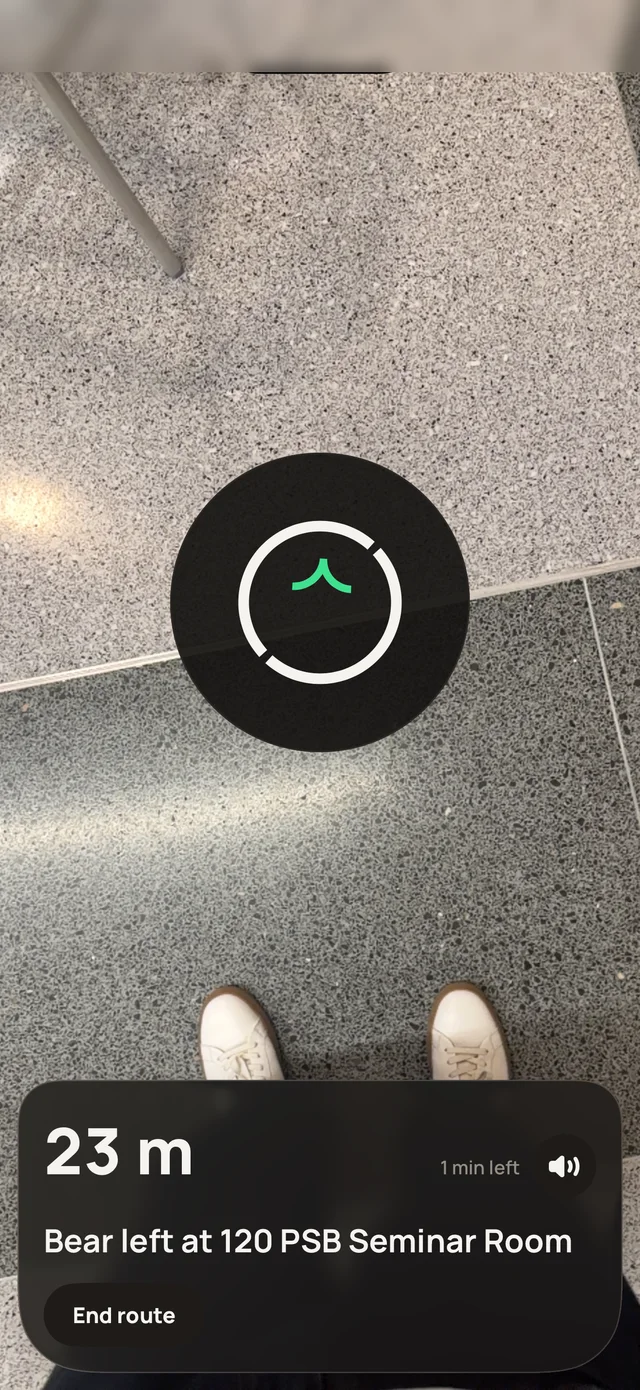
With the camera on your shoes there is nothing to draw on, so marko shows a Find My-style arrow, the distance, and one line of instruction.
A voice that can't be late
The voice guide is built for people who can't see the screen. Turn instructions are prepared when a Route starts and play straight from the phone, so they're never late for the turn. A separate conversational guide answers questions like "is there a restroom on this floor?" and can start a route for you.
What's next
A second building starts with another walk. Step-free routing switches on once the elevators are mapped; until then it stays off rather than quietly sending a wheelchair user to the stairs.
More on marko: https://get-marko.vercel.app